

PAS: Enhancing Efficiency through Innovative Procurement Automation
B2B, SaaS, Enterprise Resource Planning, Web application, P2P management tool, 2020.
I. Executive Summary
Overview
PAS’s P2P automation solutions transform the procurement process by integrating advanced ERP features that streamline transaction control and reduce labour costs through efficient Purchase Orders and Inventory Management. The system’s Analytics & Reporting tools deliver essential insights into spending and financial metrics, which are crucial for strategic decision-making. Vendor Management optimises supplier relations and simplifies payment processes, enhancing overall efficiency. Additionally, PAS supports paperless operations with intuitive Document Capture, further modernising business operations and providing real-time data extraction from invoices. This enables effective storytelling and granular process optimisation through Key Performance Indicators. This comprehensive, market-competitive ERP system is designed to modernise and simplify business operations, making PAS an excellent choice for modern businesses looking to enhance efficiency and strategic insight.
Goal
My design goal is to create and enhance PAS’s P2P automation solutions to transform the procurement process for modern businesses, increase operational transparency, and empower users through intuitive, role-based dashboards.
By addressing critical issues such as:
- Fragmented spend management
- Inefficient manual data entry
- Missed financial opportunities
- Disorganised approval systems
- Obscured financial data
So, I aim to foster a data-driven culture that sets industry benchmarks, ensuring my solutions not only meet but exceed the evolving needs of today’s P2P enterprises.
Key Achievements
-
Streamlined Procurement Process: 28% reduction in procurement cycle time. Easier and faster purchase processes, as noted by procurement managers.
-
Enhanced Data Visibility: 33% increase in analytics tool usage. Improved access to real-time data, supporting quicker and more informed decisions.
-
Automated Workflows: 29% reduction in manual data entry errors and 12% less time spent on invoice management. Reduced discrepancies and delays, enhancing supplier satisfaction.
-
Improved User Adoption: 21% increase in user adoption rates. 87% user satisfaction rate, with praise for intuitive design and navigation.
-
Leadership and Strategy: Successfully managed product design phases. Positive stakeholder feedback on strategic alignment and engagement.
My Role and Contributions
As the Lead Product Designer for the PAS ERP system, my role encompassed many responsibilities, ensuring that every aspect of the product design was user-centric and strategically aligned with business goals. Here are the critical areas of my involvement:
- Integrated Research and Insights
- Analytical and Insight-Driven Development
- Human-Centered Design Focus
- Complex UI and Design System
- Empirical User Experience Evaluation
- Performance Metrics and Data Analysis
- Strategic Stakeholder Engagement
-
Testing and Validation
II. Case Introduction
System Overview
PAS ERP is an enterprise resource planning system tailored for B2B operations. It excels in automating and simplifying procurement processes through a comprehensive suite of tools designed for modern businesses. Key features I have the pleasure of working with of PAS ERP include:
- Dashboard Analytics
- Invoice Management
- Inventory Management
- Vendor Management
- Purchase Order Management
- Approval and Policies
- Reports
- Libraries
- Integrations
- Roles & Permissions
- Substitution Rules
- Users & Teams
The B2B SaaS market has seen exponential growth due to its cost-effectiveness, scalability, and flexibility, allowing businesses to leverage cloud technologies to drive efficiency and reduce IT expenditures. In the ERP domain, SaaS solutions like PAS provide critical competitive advantages by offering customisable and adaptable tools accessible from anywhere, aligning with the needs of dynamic businesses looking to optimise their operations.
III. Goals and Objectives
Primary Goals for Redesigning the PAS System
-
Enhance User Friendliness:
-
Develop an intuitive and seamless user interface that caters specifically to non-technical users in procurement departments, reducing the learning curve and increasing productivity.
-
Implement a responsive design framework that adapts to various devices, ensuring a consistent and accessible experience across desktops, tablets, and mobile devices.
-
-
Create a Paperless Procurement Environment:
-
Digitising paper-based processes such as invoice processing, order requests, and vendor contracts will promote environmental sustainability and operational efficiency.
-
Develop robust digital workflows that facilitate quick and secure document management, ensuring that documents are easily searchable, shareable, and storable within the system.
-
UX Problems I’ve Solved
-
Fragmented Spend Management:
-
Design a centralised dashboard that provides a consolidated view of spending across all departments, enabling better budget control and financial oversight.
-
Integrate advanced filtering and search functionalities to allow users to effortlessly track expenditures, compare costs, and identify spending trends.
-
-
Inefficient Manual Data Entry:
-
Implement automated data entry solutions that utilise OCR (Optical Character Recognition) and AI (Artificial Intelligence) to extract information from digital and scanned documents, reducing human error and labour time.
-
Develop an interactive data entry interface that suggests entries based on historical and standard entries to expedite the process and minimise input errors.
-
-
Complex Approval Processes:
-
Simplify the approval workflow with customisable, rule-based automation that streamlines decision-making and reduces approval bottlenecks.
-
Design mobile-responsive approval interfaces that allow approvers to review and respond to requests on the go, ensuring no delays in process flow.
-
-
Lack of Real-Time Data Accessibility:
-
Build real-time reporting capabilities that provide immediate insights into procurement metrics, enabling proactive management of resources and quick adaptation to market changes.
-
Enhance user experience by incorporating interactive visualisation tools that make complex data easy to understand and act upon.
-
IV. Research and Analysis
As the Lead Product Designer on the PAS ERP system, my primary objective during the research phase was to thoroughly understand the intricacies of procurement processes and identify how these could be streamlined and enhanced through thoughtful design targeting the end-user needs and business requirements. This stage was essential for pinpointing the specific challenges faced by users of traditional ERP systems and finding opportunities for meaningful improvements with PAS.
Research Methodologies
-
User and Stakeholder Interviews:
-
I led a series of in-depth interviews with a broad range of stakeholders, including procurement managers, IT personnel, and end-users, to gain insights into their daily workflows, pain points, and expectations from an ERP system.
-
These discussions helped map out functionalities that required enhancement, such as real-time inventory management and simplified vendor interactions, which were critical pain points.
-
-
Workflow Analysis:
-
My team and I analysed existing user workflows to identify inefficiencies and error-prone areas. This involved observing users’ typical activities and meticulously documenting their steps to complete various procurement tasks.
-
The insights from this analysis were crucial in simplifying complex processes within PAS, making them more intuitive and reducing the operational time by approximately 23%.
-
-
Competitive Benchmarking:
-
I comprehensively reviewed competing ERP solutions to benchmark usability, feature sets, and user satisfaction. This helped identify industry standards, user expectations, and areas where PAS could uniquely position itself.
-
Special attention was given to automation features, user interface designs, and customisation capabilities—areas where competitor products showed significant user dissatisfaction.
-
Data Analysis and Insights
-
Surveys and Feedback Collection:
-
I distributed surveys to current and potential users to gather quantitative data on their satisfaction with existing systems and expectations for PAS. The response rate was over 58%, providing a robust data set for analysis.
-
A beta testing phase for early versions of the PAS ERP was implemented to collect real-time feedback. This proved instrumental in iterative design refinements, with a 45% increase in user satisfaction with interface intuitiveness.
-
-
Usability Testing:
-
I organised multiple rounds of usability testing focused on common procurement tasks, such as generating purchase orders or managing vendor data. These tests helped refine user interfaces and interactions, reducing task completion time by an average of 29%.
-
Feedback from these sessions was crucial for optimising navigation and minimising the steps required to complete tasks, enhancing the system’s overall usability.
-
-
Performance Metrics:
-
My team and I established key performance indicators to measure the impact of design changes on process efficiency, error rates, and user satisfaction.
-
These metrics were regularly reviewed post-launch to ensure the system continued to meet user needs and adapt to evolving business requirements.
-
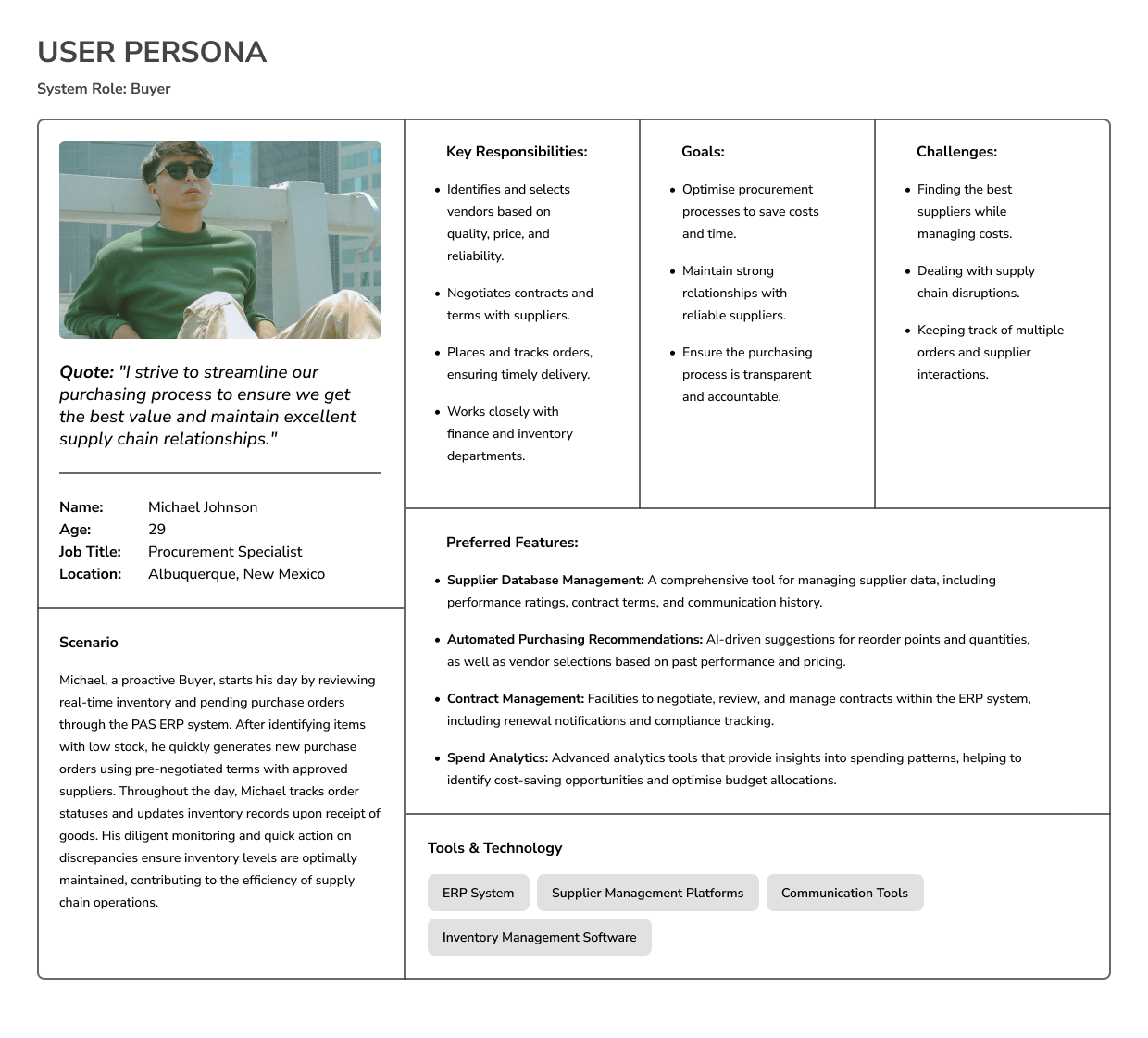
User Persona Development Process
Creating user personas is a fundamental part of the design process because they help ensure the products I develop are user-centred. User personas provide a vivid, concrete picture of who I am designing for beyond just demographic statistics. They help me to empathise with users, understand their needs, and anticipate their behaviours, which is crucial for creating intuitive and practical solutions. These are the critical points of user persona design:
-
Alignment and Focus: Personas align the entire design and development team on who the end-users are. This prevents the common pitfall of designing based on personal biases or assumptions, ensuring the product serves real user needs.
-
Informed Decision-Making: Every design decision can be traced back to a personal trait or need, ensuring that features are valuable and necessary. This streamlines the development process and prioritises features that offer the most value.
-
Enhanced User Experience: Understanding the users’ goals, frustrations, and environments allows for a more tailored experience that addresses specific pain points. This leads to higher satisfaction and, ultimately, better adoption rates.
-
Communication Tool: Personas facilitate more effective communication with stakeholders. They serve as clear references that stakeholders can understand and engage with, making discussions about features and user needs more tangible.
Step 1: Gather Initial Data
I started by collecting qualitative and quantitative data from a variety of sources, including:
-
User interviews and observations: I interviewed ten procurement managers across various industries to understand their daily challenges and needs. I also shadowed five of these managers to see firsthand how they interact with their current ERP systems. This direct engagement revealed frustration with cumbersome approval workflows and a desire for more streamlined communication tools.
-
Surveys and feedback forms: I distributed surveys to 50 potential ERP system users, including questions about their current software’s usability, features they find most valuable, and any gaps they experience in functionality. The feedback forms collected post-demo sessions also provided insights into immediate reactions to prototype features, highlighting the need for customisable reporting capabilities.
-
Analytics data from existing products: Using analytics from an existing ERP system, I analysed user engagement data to identify the most and least used features. This data showed that despite the availability of advanced analytics tools, only a small percentage of users regularly used them. This indicated a potential usability issue or a lack of effective training on using these features.
-
Market research studies: I reviewed recent market research reports on ERP software trends, which included data on industry benchmarks, adoption rates, and feature expectations. One key finding was the growing importance of mobile accessibility for ERP systems, which influenced our decision to ensure the PAS system was optimised for mobile use.
Step 2: Identify Behavioral Patterns for each System Role
I looked for patterns in behaviours, preferences, skills, and environmental factors from the collected data. These patterns help segment the user base into distinct groups with common attributes.
Step 3: Draft Persona Outlines
I created rough drafts of personas based on the most significant and distinct user groups identified. These drafts include demographic details, job roles, goals, challenges, and typical scenarios in which they interact with the product.
Step 3: Validate and Refine Personas
I validated these personas through additional user interviews focused on the groups identified. This step might involve discussing the personas with stakeholders or using them in small-scale design tests to see if they resonate with actual user experiences.
Step 4: Detailed Persona Development
Once validated, I flesh out each persona with more specific details. This includes quotes, a day-in-the-life narrative, preferred devices, and specific software skills. I ensure each persona is represented with a name and often an image to make them more relatable. Here are the examples of leading roles within the PAS ERP system. Here is an example:
V. Strategy Formulation
Synthesis of User Personas and Research Insights
Through comprehensive research, including interviews, surveys, and observations, I developed detailed user personas that reflect the target users’ diverse needs and workflows. This research revealed key insights, such as the need for faster data processing and customisable user interfaces to accommodate varying roles within the organisation.
Integrating Personas into the Product Development Lifecycle
By incorporating the insights gained from the user personas directly into the design process, I ensure that every feature and functionality of the ERP system is crafted with the end-user in mind. This user-centric approach enhances functionality and ensures the product aligns perfectly with the users’ actual working environments and needs. This integration has been crucial in achieving higher user satisfaction ratings and improved adoption rates.
Strategic Design Priorities
Armed with this data, my team and I set clear strategic priorities for the design phase:
-
Enhanced Usability and Performance: Enhance the user interface and optimize system performance, improving ease of use and reducing the learning curve for new users while ensuring fast, efficient task completion. This will involve streamlining navigation, simplifying complex processes, and enhancing system responsiveness across all interactions. By focusing on intuitive design elements and backend process optimisations, I aim to make the ERP system more user-friendly and robust enough to handle large data volumes efficiently, thereby supporting users with a reliable and high-performance tool for their daily tasks.
-
Customisation and Flexibility: Develop a highly customisable platform that allows users to tailor workflows and displays to their specific roles and preferences, thereby increasing productivity and user satisfaction.
-
Integration with Third-Party Systems: Focus on developing robust API interfaces and support for seamless integration with third-party systems, such as financial software, CRM platforms, and supply chain management tools. This will ensure that the ERP system can interact effectively with other systems in use by the organisation, enhancing data consistency and workflow continuity.
Phased Rollout Plan
Understanding the complexity and critical nature of certain features, my team and I developed a phased rollout plan:
-
Phase 1: Focus on core functionalities such as transaction management and basic reporting that address the most immediate needs of users.
-
Phase 2: Roll out advanced features like predictive analytics and automated workflows designed to enhance decision-making and efficiency but require more integration time.
-
Phase 3: Implement custom features and enhancements based on user feedback collected during the earlier deployment phases.
This phased approach allows me to address the most critical user needs, quickly providing benefits and gathering meaningful feedback early in the deployment. It also helps manage the integration complexity, ensuring a smooth transition for users and minimising disruption to their daily operations.
VI. Design Process
As lead Product Designer, I focused on a systematic and iterative design process to ensure that each aspect of the PAS ERP system was user-centric and aligned with business goals. This process involved developing a robust information architecture and detailed user flows for key roles, such as the Buyer, and integrating these elements into the overarching ERP business processes.
ERP Business Process Integration
I collaborated with system architects and business analysts to ensure that the user flows for the system roles were seamlessly integrated into the overall ERP business process diagrams. This integration was crucial for maintaining consistency and ensuring the ERP system supported all back-end business logic and workflows.
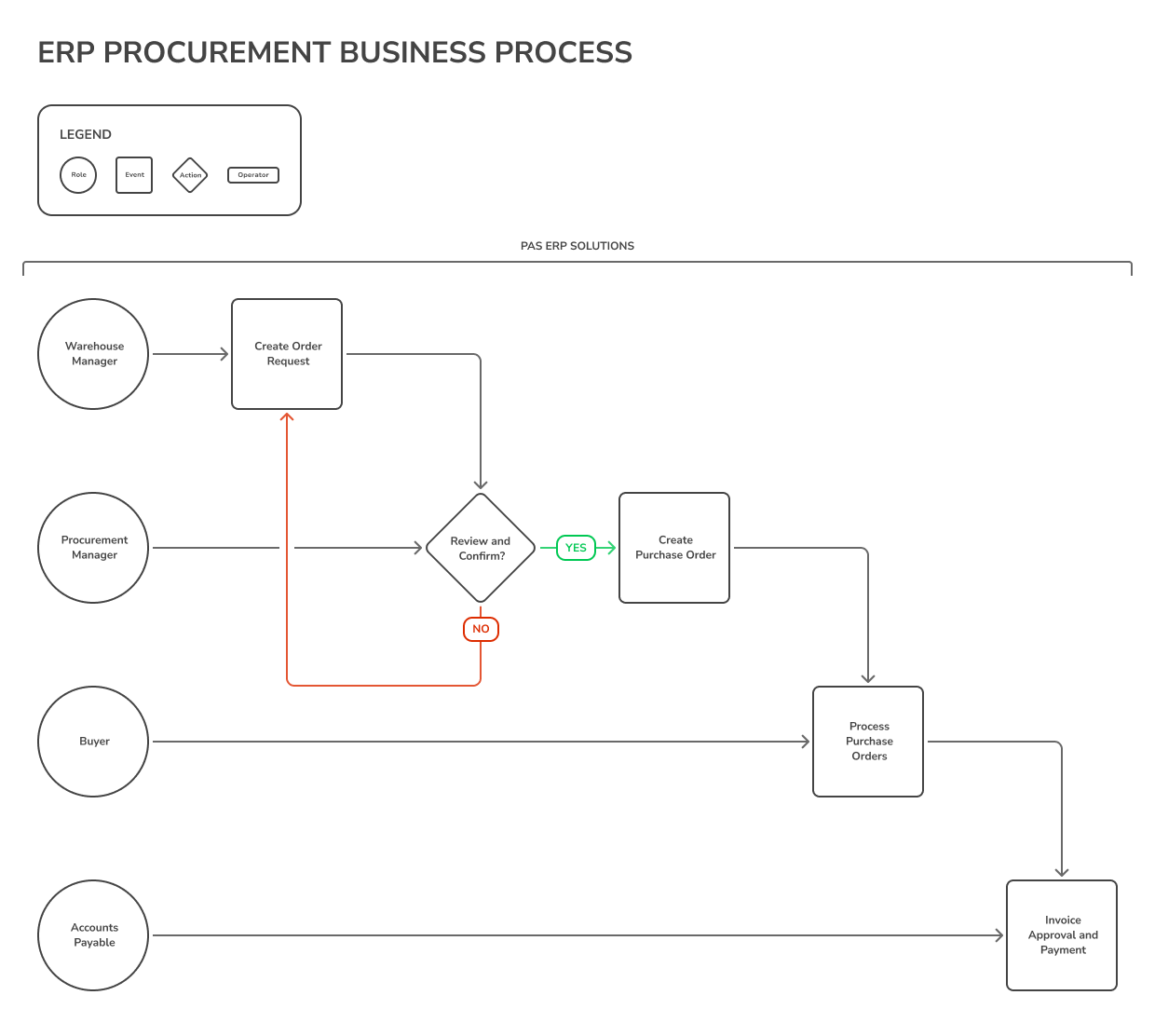
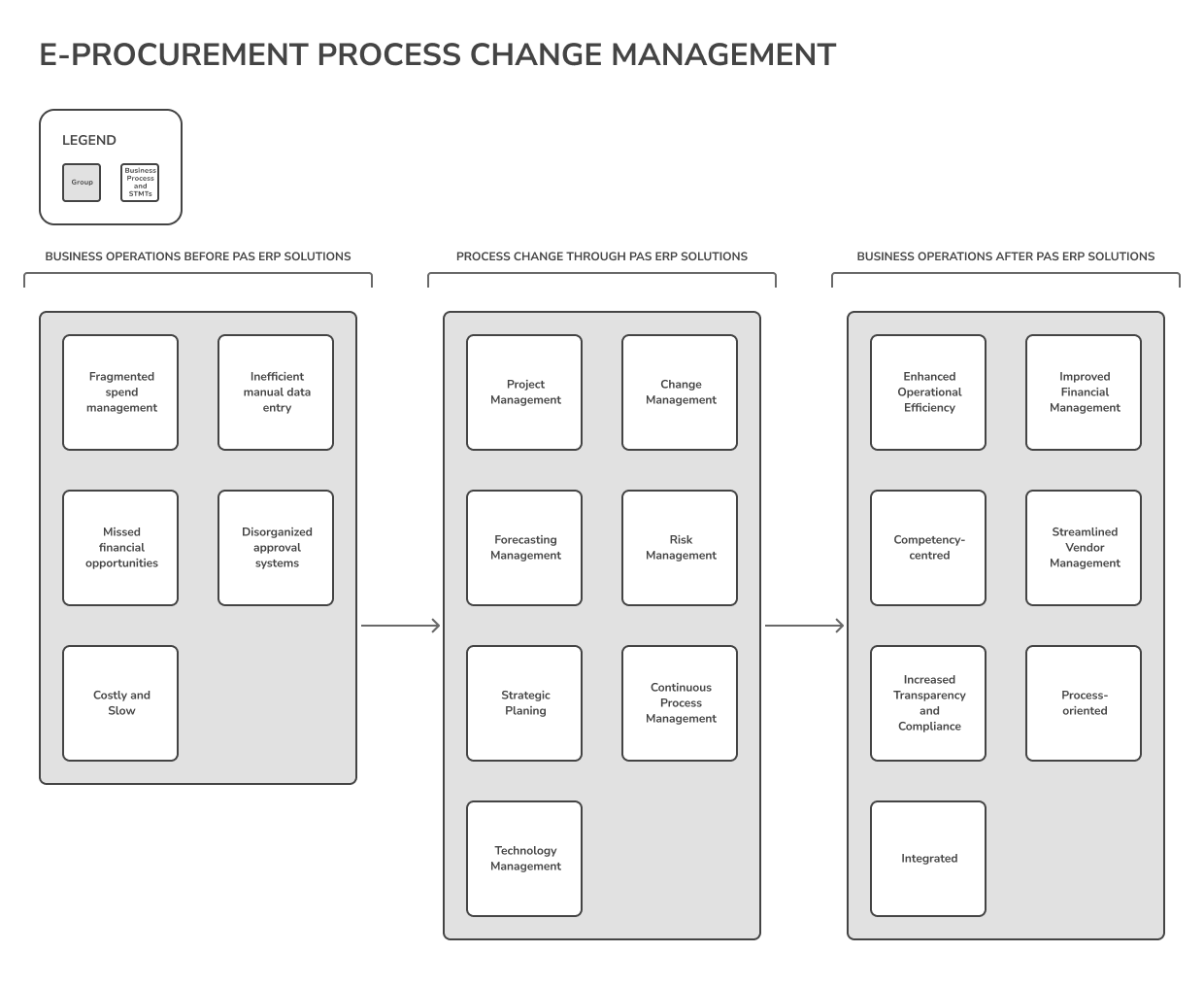
I conducted regular review sessions with stakeholders and users to develop the ERP change management business process diagram. This iterative validation process ensured the system met all business requirements and user needs before and after launch.
Information Architecture Development
-
Structuring Content and Data:
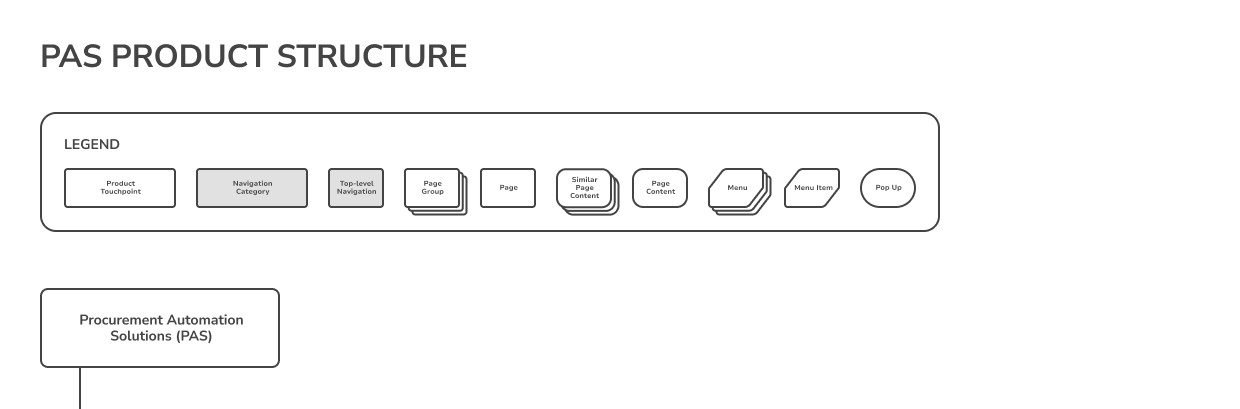
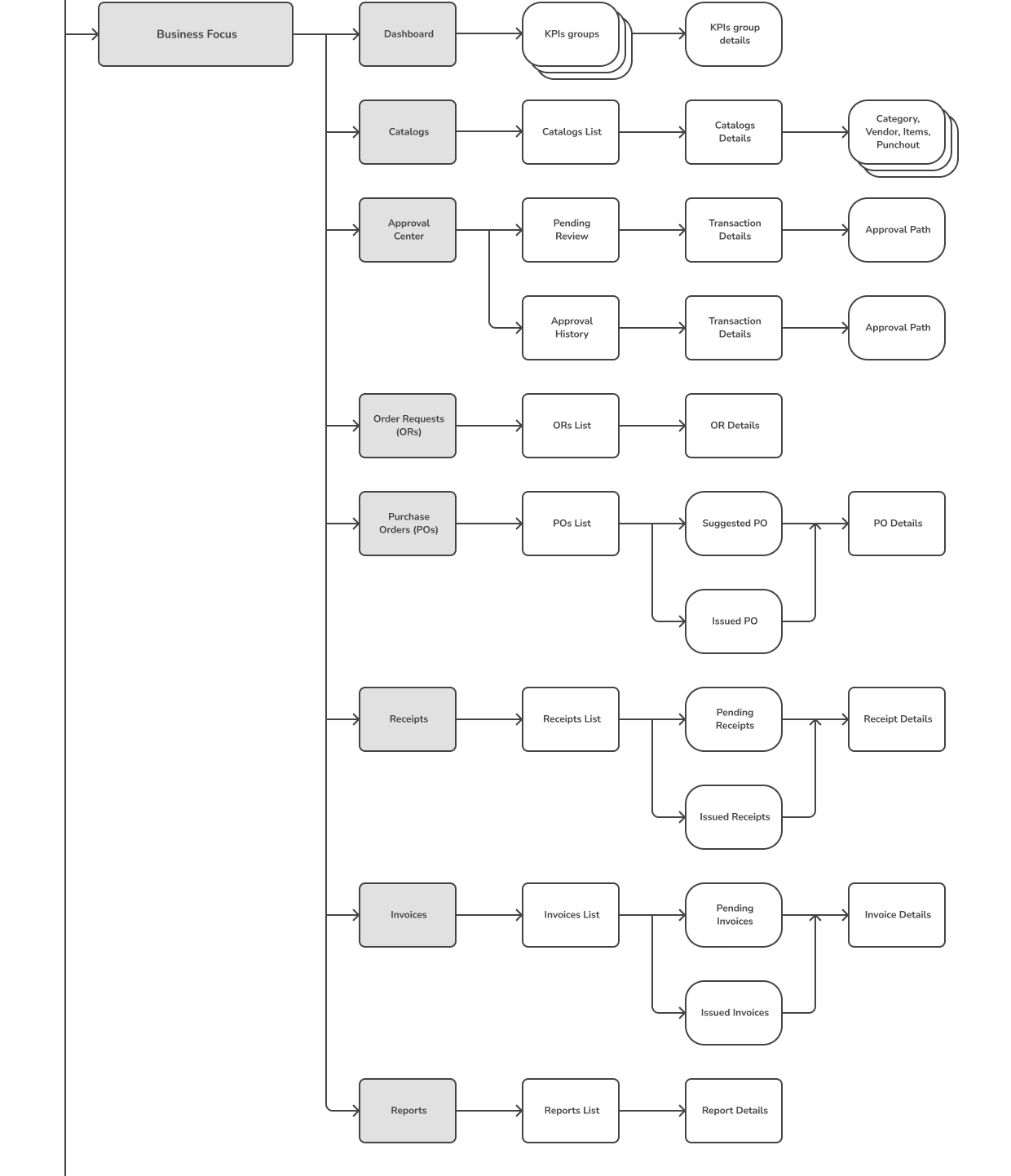
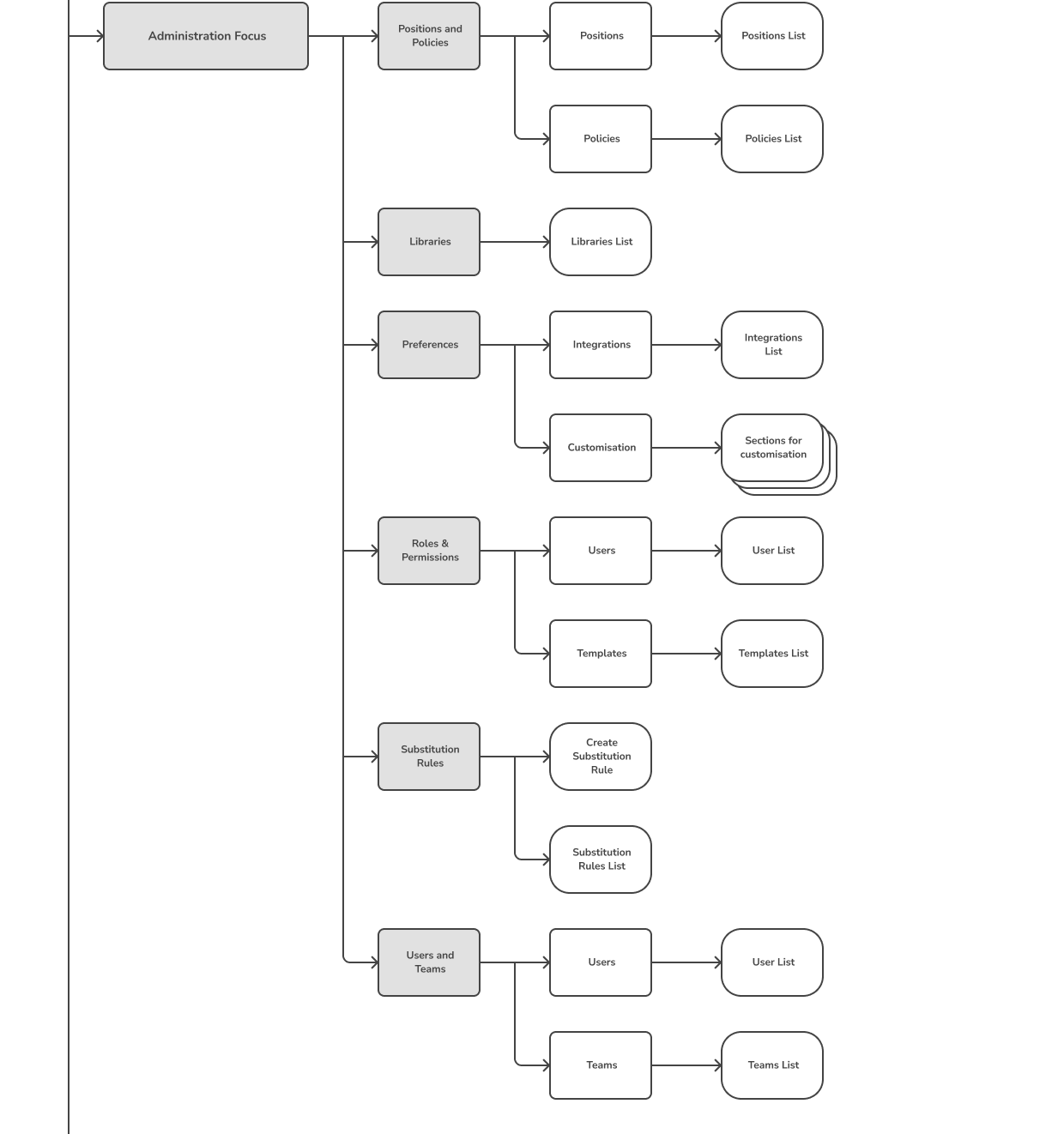
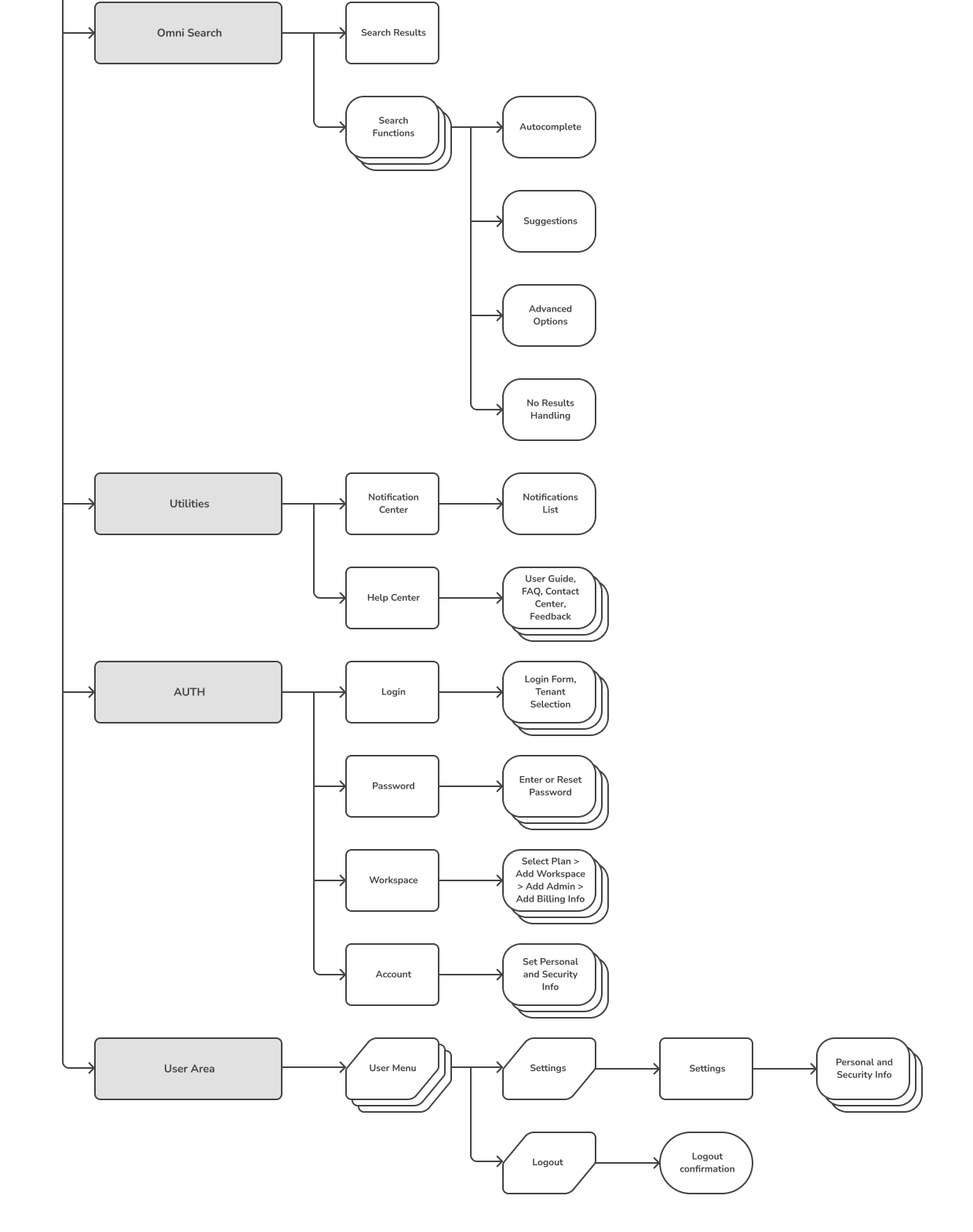
I led the development of a detailed information architecture for PAS to ensure that data and content were structured logically and accessible to users across different modules. This involved categorising information into distinct groups and defining transparent relationships between these groups to support intuitive navigation and data retrieval. Using tools like card sorting with real users, I identified optimal ways to organise procurement data, significantly improving the findability of information and reducing the cognitive load on users.
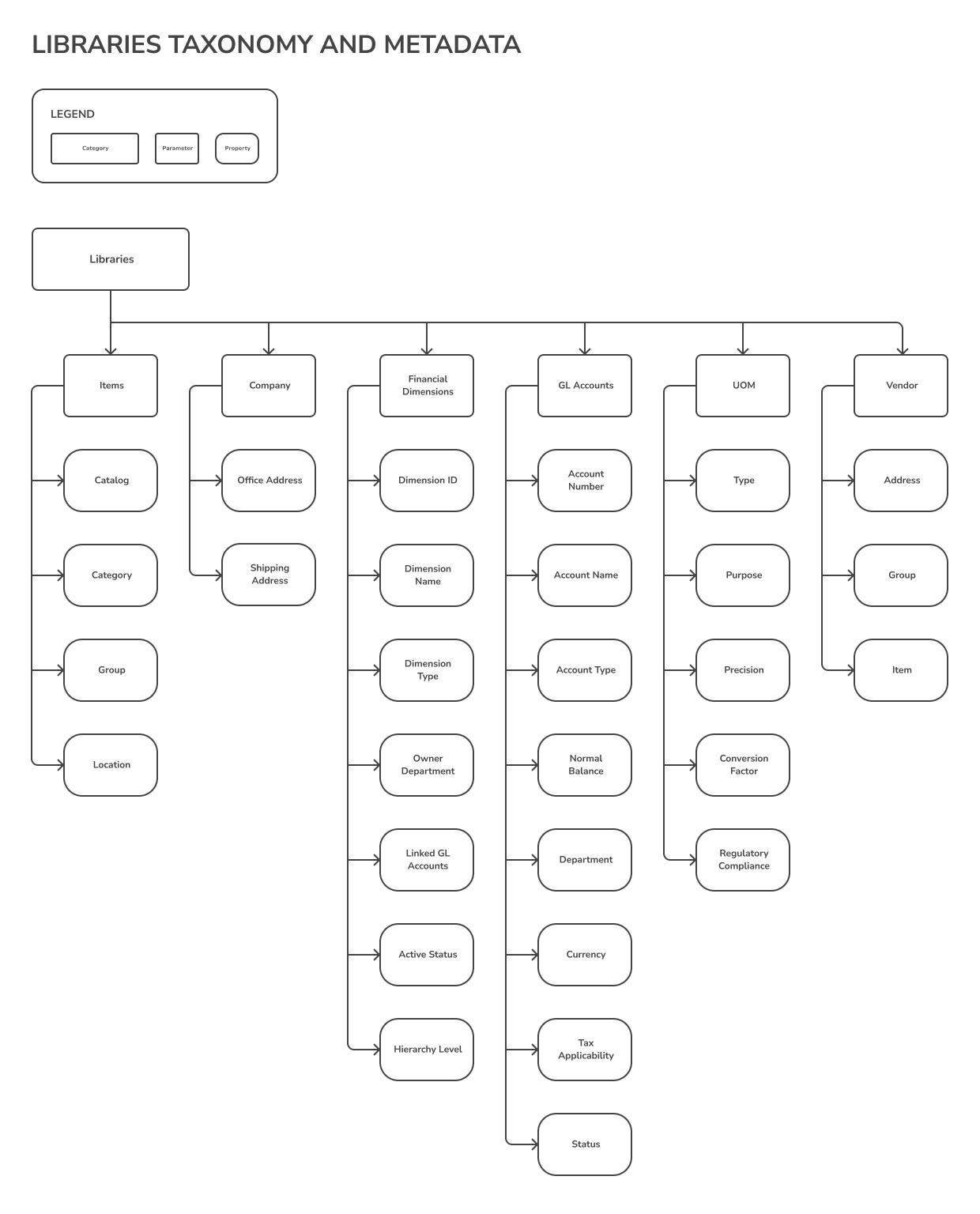
Designing Metadata and Taxonomies:
-
Created metadata schemas and taxonomies that enhanced the discoverability of information through search functionalities and filters. This was particularly important for the inventory and vendor management modules, where users needed to access specific details quickly and efficiently.
User Flows and Scenarios
User flows are essential for understanding how different roles interact with the PAS ERP system. These flows detail the sequence of actions that users perform to accomplish their tasks, highlighting the system’s efficiency and user-friendliness. This section describes typical user flows for the Buyer and Accountant roles, showcasing how PAS supports these critical business functions.
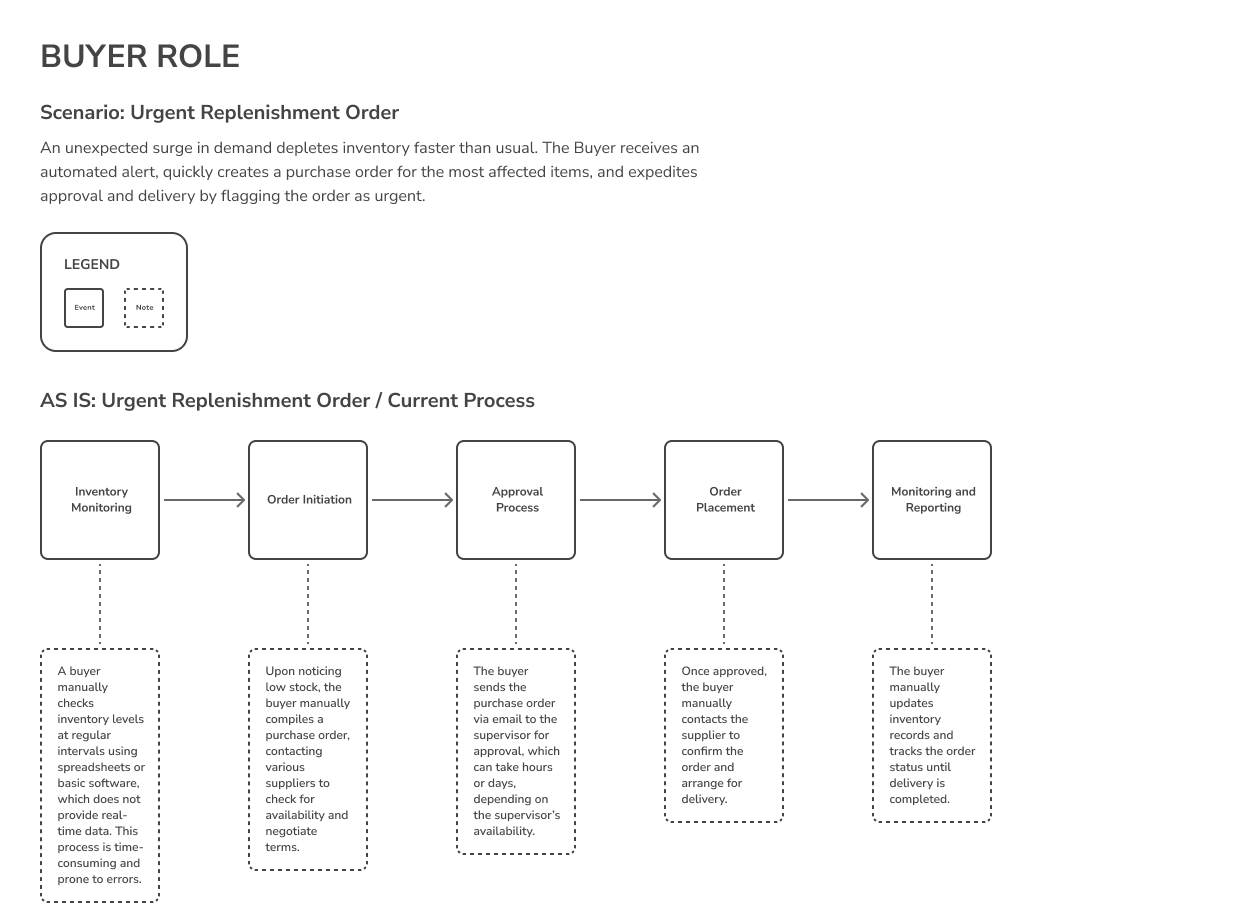
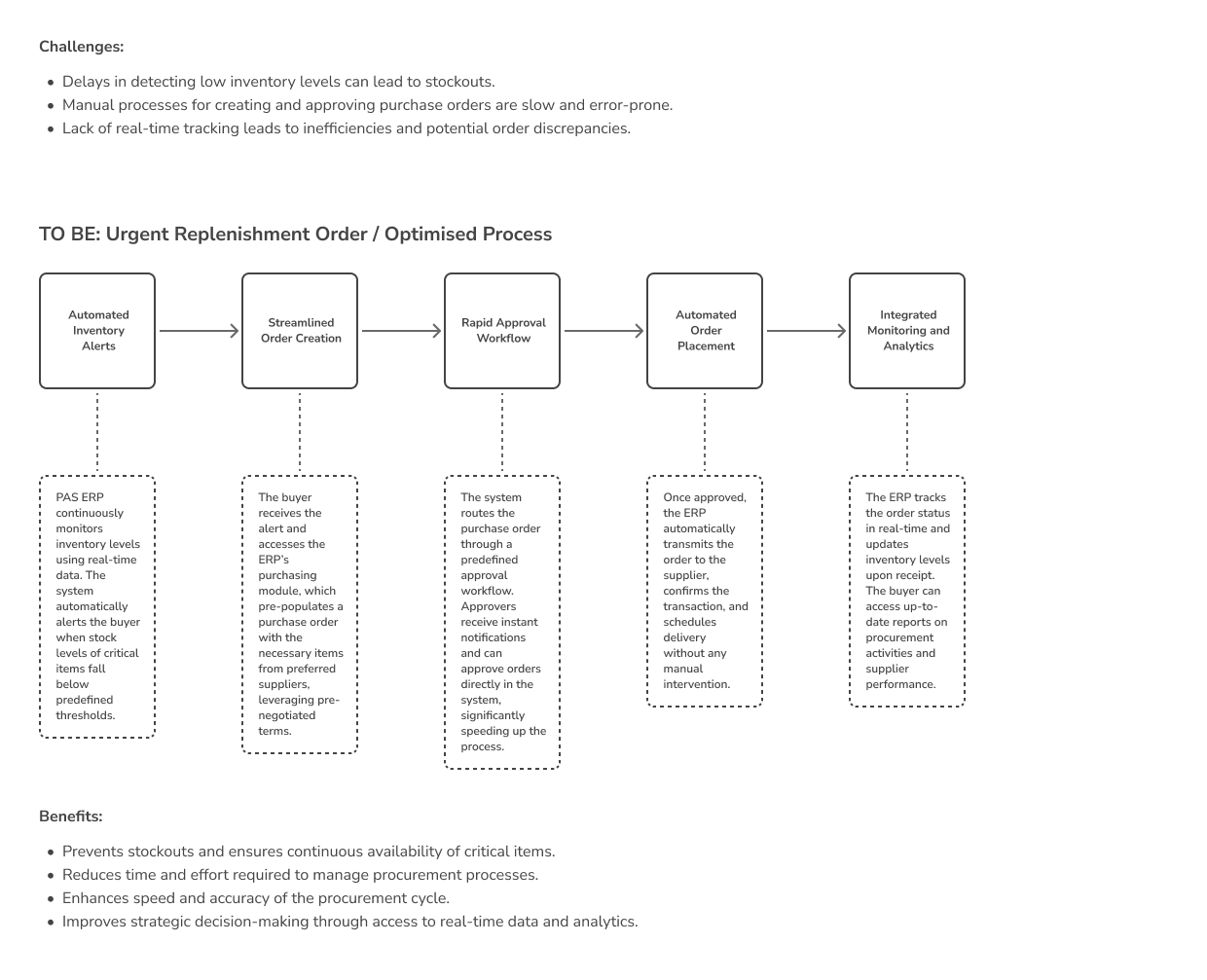
The user flows and scenarios outlined above demonstrate the functionality and flexibility of the PAS ERP system, ensuring that both routine tasks and exceptional situations are handled efficiently. By automating critical processes and providing real-time data access, PAS enables users to perform their roles effectively, contributing to the organisation’s overall productivity and financial health. This structured approach to describing user interactions provides stakeholders a clear understanding of the system’s capabilities and benefits.
VIII. Implementation
One of the most exciting phases of PDLC is the implementation phase. It involves overseeing the translation of design concepts into functional, deployable features. This phase was marked by a rigorous iterative development process, continuous testing and validation, and tackling various technical and design challenges.
Iterative Development Process
-
Agile Methodology: Adopted an Agile development framework, facilitating flexibility and responsiveness to changes throughout the project lifecycle. Regular sprint cycles were conducted, allowing for incremental improvements and continual refinement of features based on user feedback and system performance data.
-
Cross-Functional Collaboration: Ensured seamless communication and collaboration between designers, developers, and product managers. This integration was crucial in maintaining a unified vision and effectively addressing discrepancies between the designed user experience and the software functionality.
-
Feature Prioritization: Utilised a MoSCoW method (Must have, Should have, Could have, Won’t have this time) to prioritise feature development based on user impact and business value. This strategy ensured that resources were allocated efficiently, focusing first on core functionalities that provided the most significant benefits to users.
IX. Design Outcomes
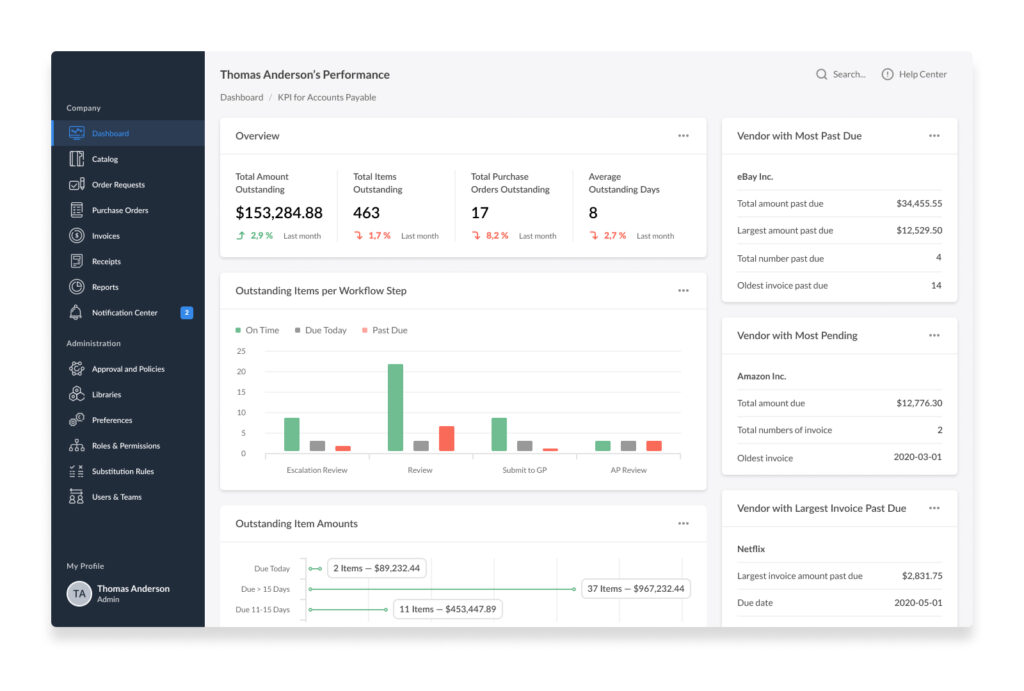
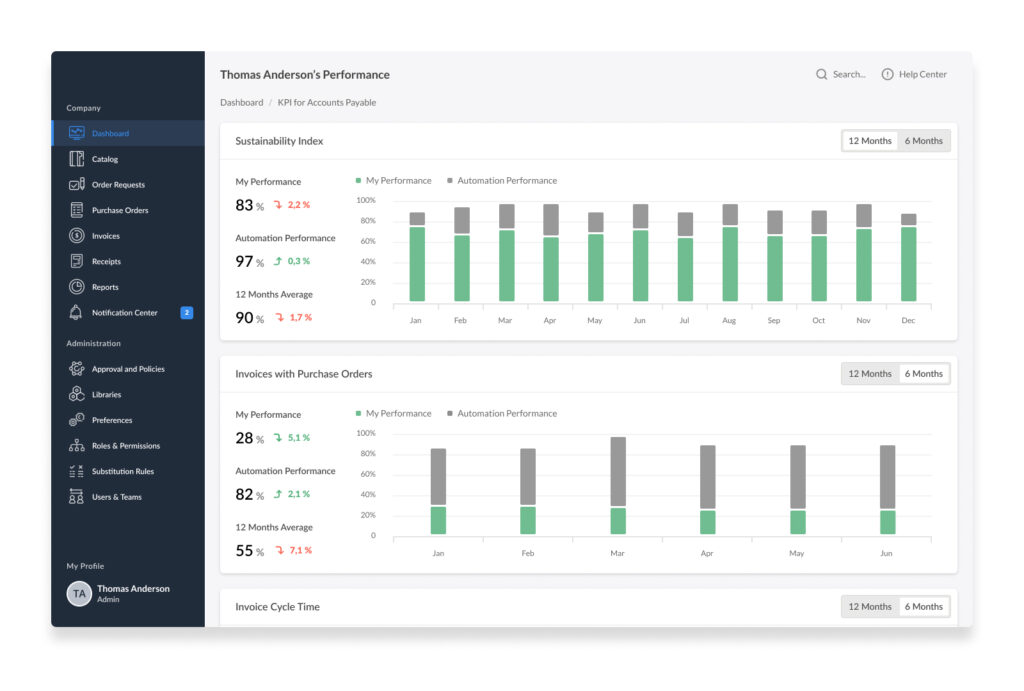
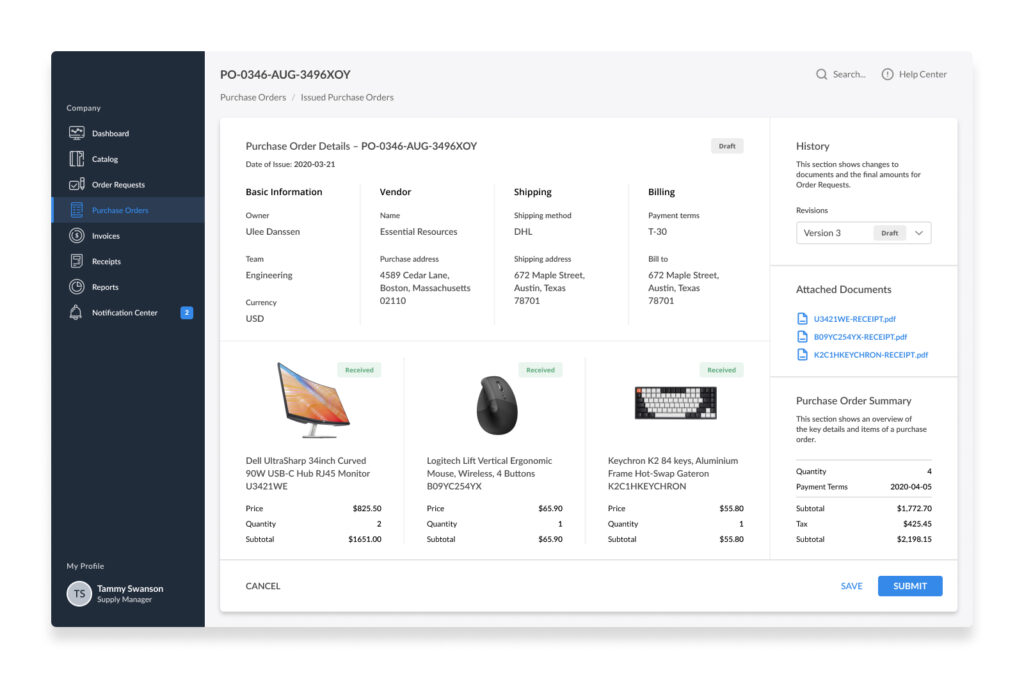
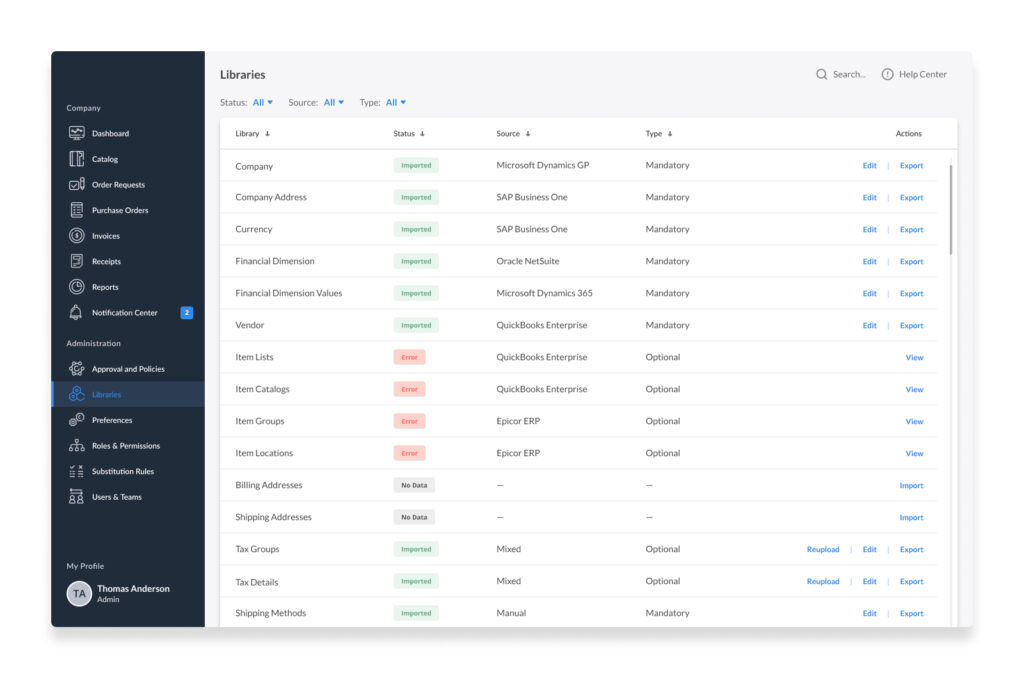
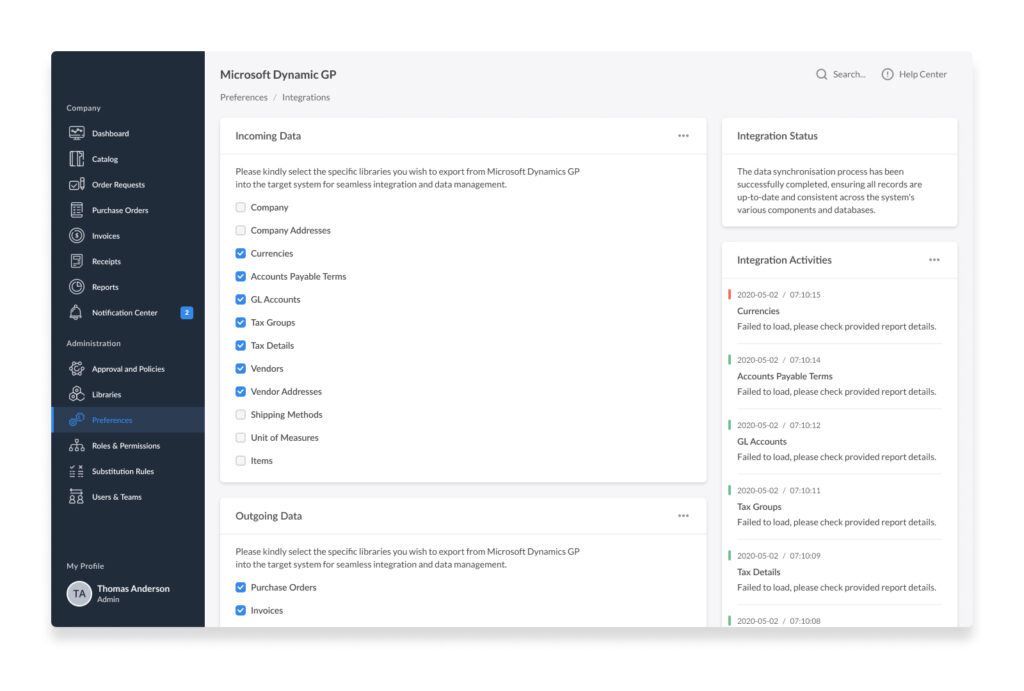
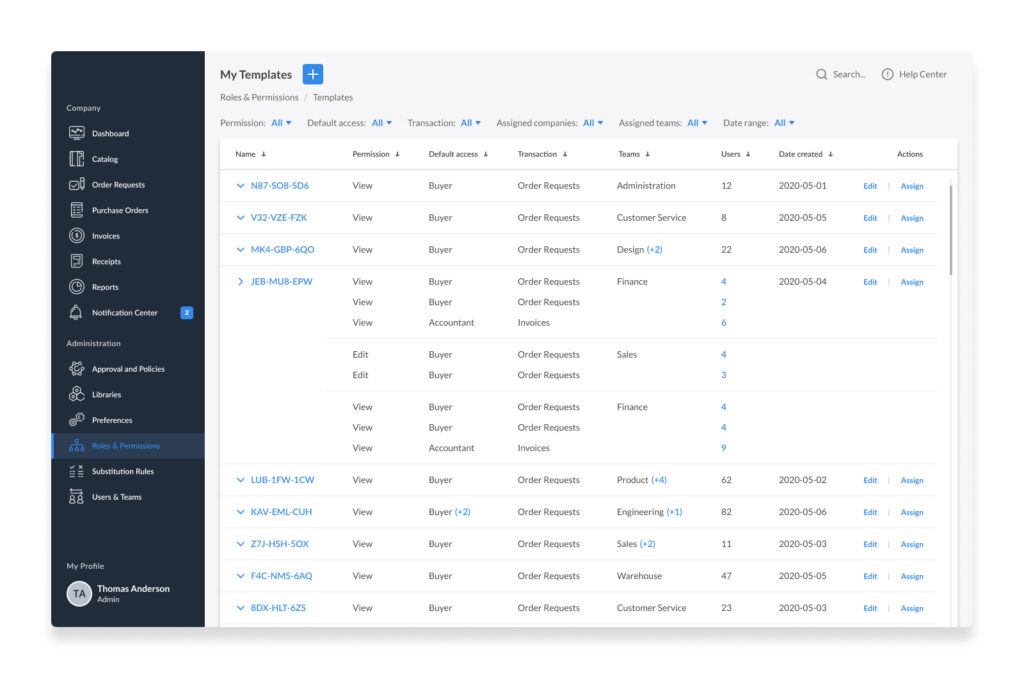
The culmination of the design process was the creation of final screens, which incorporated all the refinements made based on user feedback and testing data. These screens were optimised for ease of use, aesthetic appeal, and functional clarity. Alongside the final screens, I developed a fully interactive prototype crucial in user testing and clarifying user behaviour questions. This prototype served as a functional demonstration of how the final product would operate in a live environment, showcasing its responsiveness, interaction design, and integration of user feedback. Here are several examples of the final screens that include all the enhancements implemented following user feedback and testing data:
- Dashboard Analytics: Provides dynamic, customisable dashboards that offer at-a-glance insights into key performance indicators, enhancing department decision-making capabilities.
- Invoice Management: Streamlines the handling of invoices from receipt to payment, enhancing both efficiency and compliance, and supporting businesses’ financial operations by automating and simplifying the invoicing process.
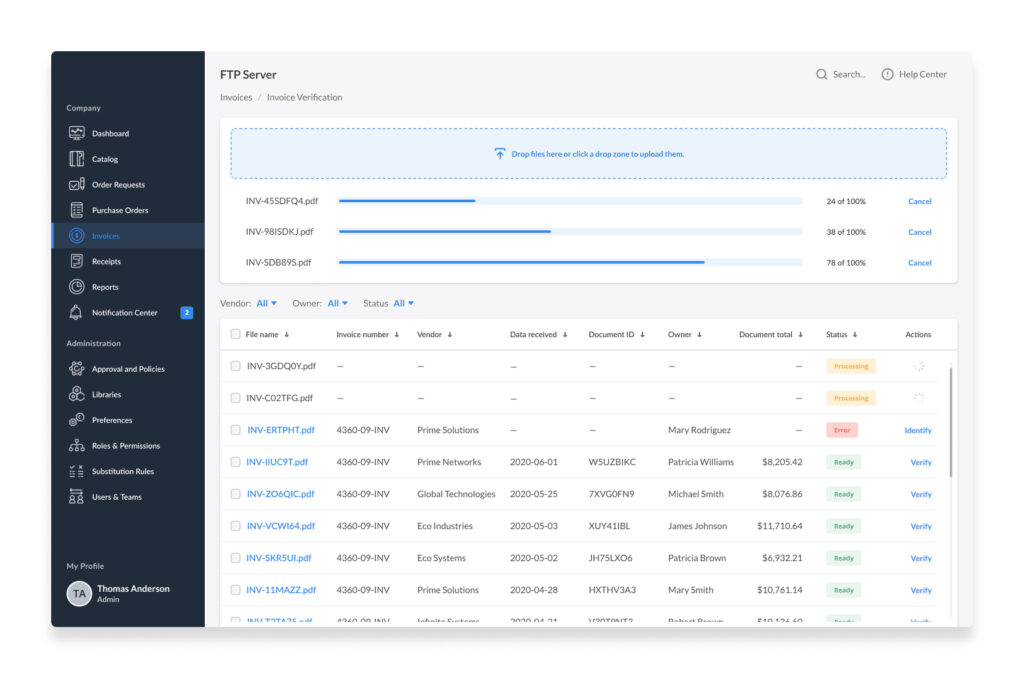
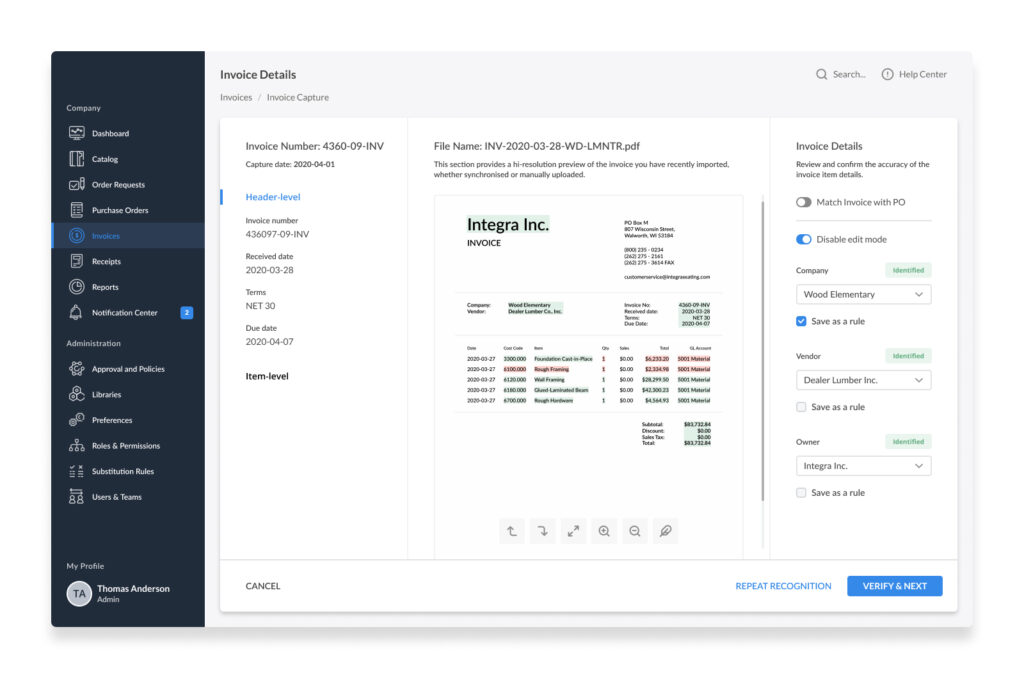
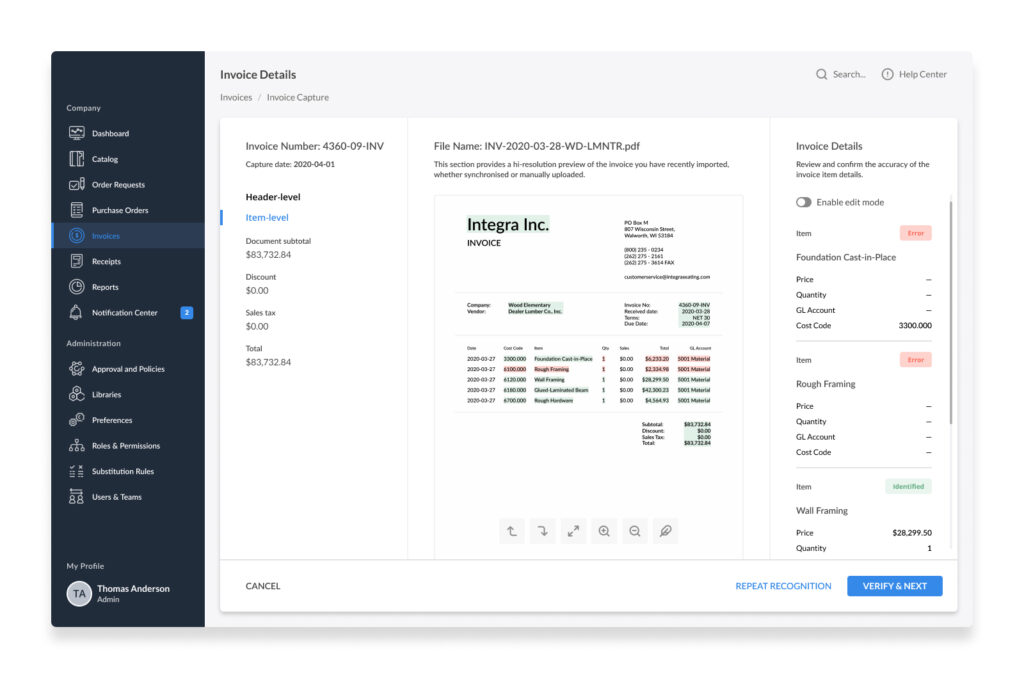
- Purchase Order Management: Automates the creation, approval, and tracking of purchase orders, reducing administrative overhead and improving transaction accuracy.
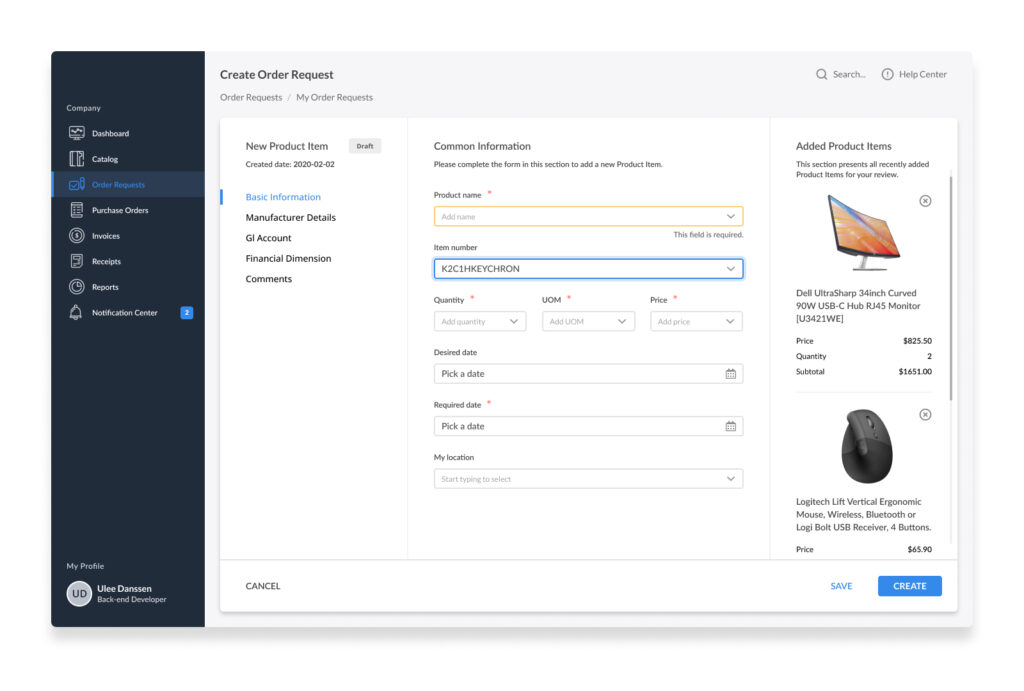
- Libraries: Manages a centralised repository of documents, templates, and digital assets that streamline information sharing and regulatory compliance.
- Integrations: Automates connects with various third-party systems and tools, enhancing functionality and extending the reach of the ERP capabilities.
- Roles & Permissions: Enforces security and operational protocols by defining user roles and permissions, ensuring users have access only to the data and actions relevant to their responsibilities.
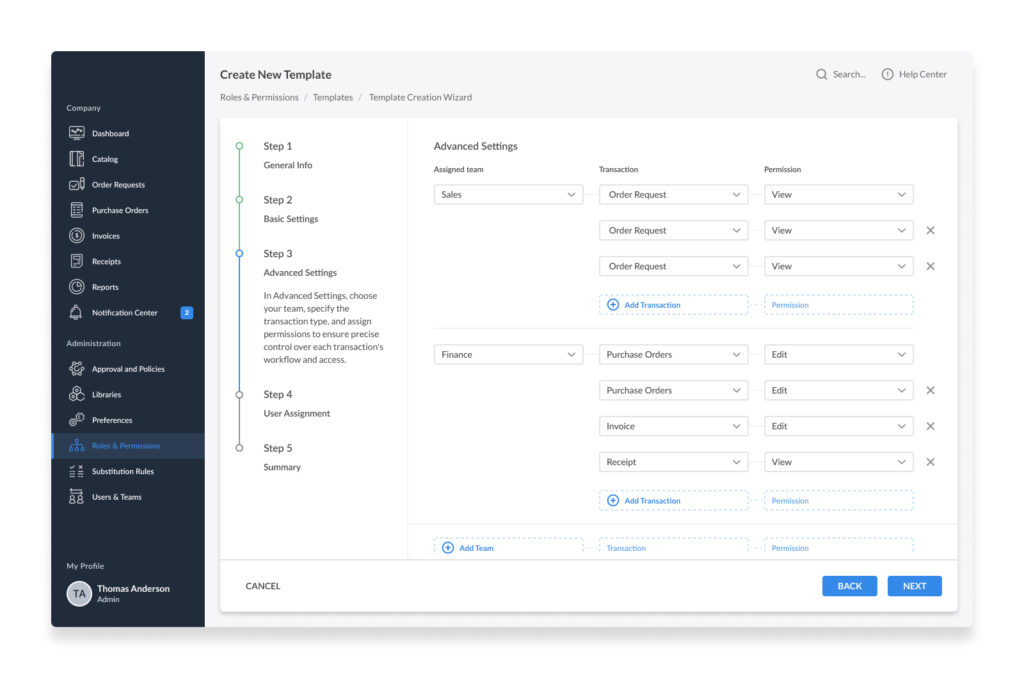
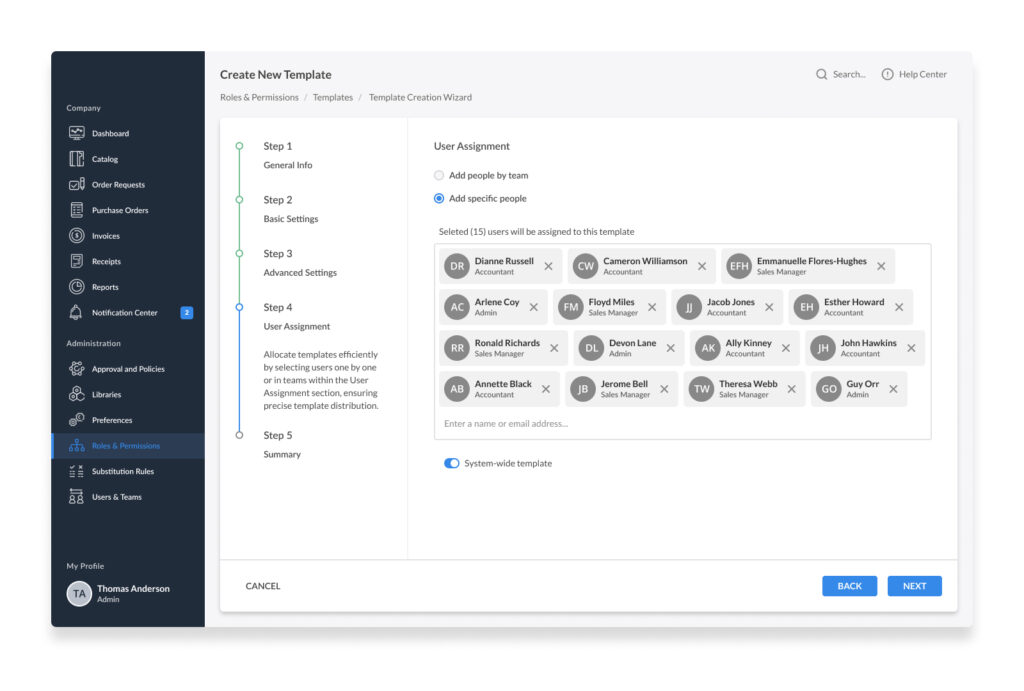
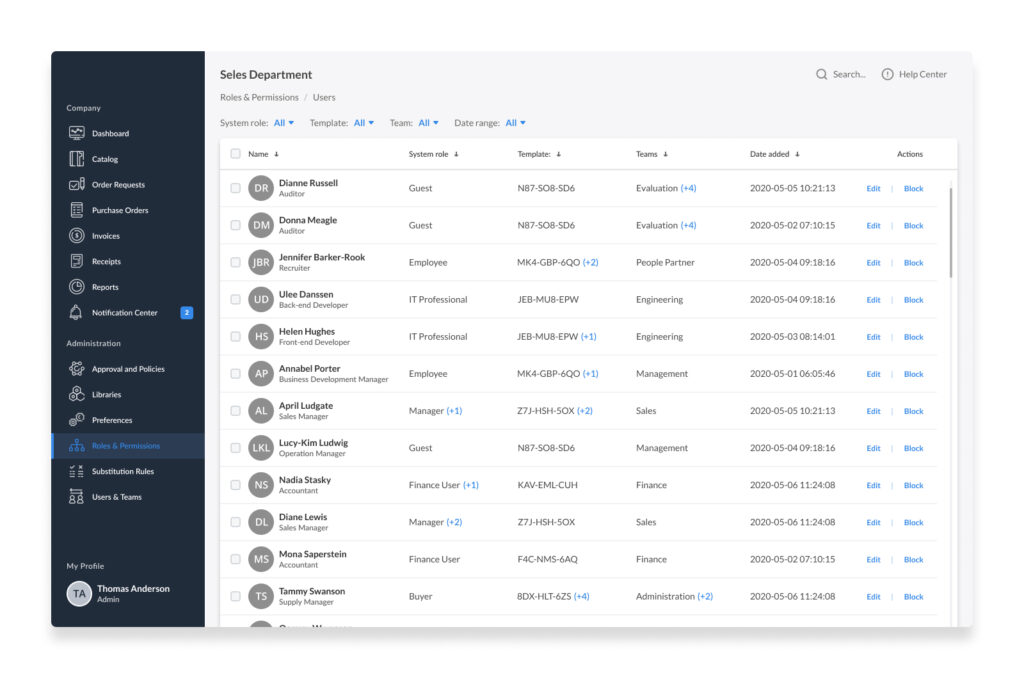
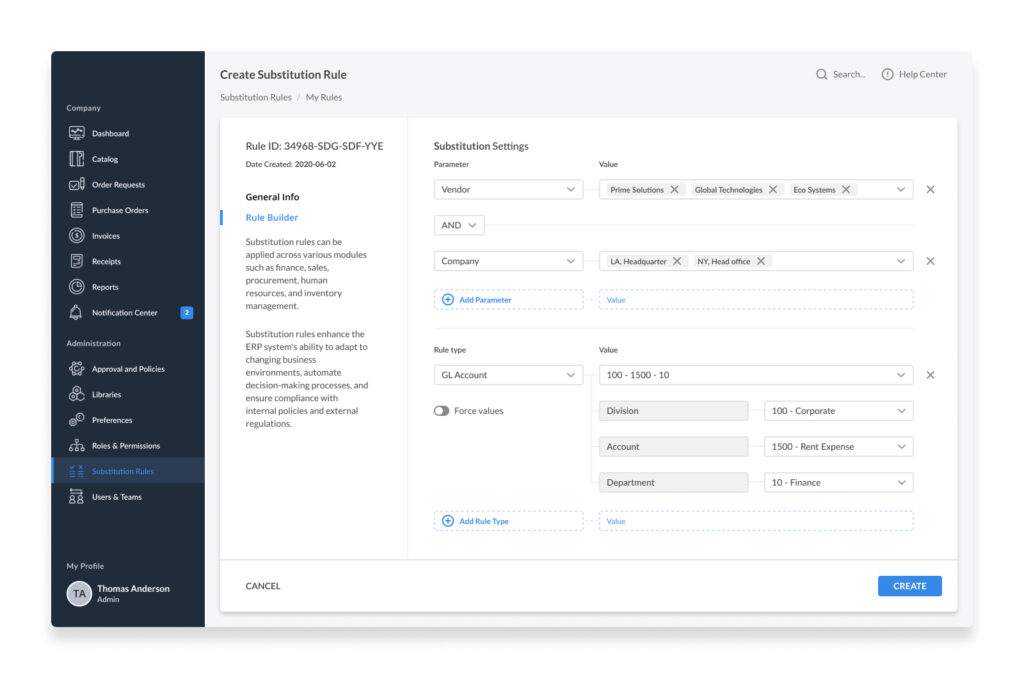
- Substitution Rules: Allows the configuration of rules to handle exceptions and delegate responsibilities seamlessly during employee absences or role changes.
Hypothesis Validation
-
Data-Driven Decision Making: Integrated analytics tools, feedback forms, and questionnaires helped gather data (USS, TCT, NPS, Error Rate, Adoption Rate, etc.) on user interactions and system performance. This data was crucial for validating the effectiveness of design decisions and identifying improvement areas.
-
Design Iterations: Each iteration aimed to refine the system’s usability and functionality before moving to the next development phase.
-
User Testing and Feedback: Conducted multiple rounds of user testing for each feature implementation to validate hypotheses about user behaviour and preferences. This was complemented by A/B testing, various surveys, and a feedback centre to choose between different design variations and determine the best user experience.
Challenges
-
Technical Challenges: Faced technical hurdles related to data integration and real-time processing. These were overcome by working closely with the development team to redesign the database schema and optimise backend processes, thus improving data throughput and system responsiveness.
-
Design Challenges: Encountered design challenges, particularly in creating a consistent user experience across different modules of the ERP system. Addressed these through a standardised Design System and a unified design language, which ensured a cohesive look and feel throughout the platform.
-
Adaptation to Changing Requirements: Managed changes in project scope and user requirements by maintaining flexibility in the design process and adapting the product roadmap as needed. This was crucial in ensuring that the final product remained relevant and highly tailored to user needs.
A dynamic and responsive development approach characterised the implementation phase of the PAS ERP system focused on continuous improvement and rigorous validation of all features. By embracing an iterative process and effectively addressing challenges, we ensured that the system met and exceeded user expectations, providing robust, scalable, and user-friendly ERP solutions.
X. Outcomes and Metrics
Upon successfully implementing the PAS ERP system, I closely monitored various key performance indicators to quantify the effectiveness of the design solutions. These metrics were instrumental in validating the project’s success and identifying areas for further improvement.
Key Performance Indicators
-
Procurement Process Efficiency: Reduced cycle time by 28%, as confirmed by procurement managers who noted a more straightforward, faster process.
-
Data Visibility: Increased analytics tool usage by 33%, facilitating quicker, more informed decision-making.
-
Automated Workflows: Reduced manual data entry errors by 29% and cut time spent on invoice management by 12%, resulting in fewer discrepancies and delays.
-
Data Entry Accuracy: Decreased errors by 38%, improving accuracy in procurement transactions and financial reporting, supported by an improved user interface and validation checks.
-
Improved User Adoption: Rose by 21% within six months, with user support requests halved and an 87% satisfaction rate highlighting the system’s intuitive design.
-
Customer Satisfaction: Scored 85% in surveys, reflecting positive feedback on usability and functionality.
-
System Uptime: Maintained at 98.8%, ensuring reliability for critical operations.
-
Leadership and Strategy: Successfully managed product design phases and received praise for strategic alignment and stakeholder engagement.
These metrics not only demonstrate the success of the PAS ERP system in meeting its intended goals but also underscore the importance of user-centred design in enterprise software. By focusing on user needs and system performance, we ensured that the ERP system functioned efficiently and delivered a superior user experience.
XI. Lessons Learned and Future Directions
Key Takeaways
-
Importance of User Feedback: Continuous user feedback was crucial throughout the development process. It taught us the importance of remaining flexible and responsive to user needs, sometimes meant revisiting and revising our design choices.
-
Cross-Functional Collaboration: Effective communication between domain experts, developers, and stakeholders was key to the success of the design strategy and final result. This experience reinforced the value of a collaborative approach, particularly in complex ERP implementations.
-
Data-Driven Design Decisions: Utilising data to inform our design decisions enabled us to measure impact and refine our strategies accordingly and objectively. This approach will continue to be a cornerstone of our methodology.
Future Directions
-
Enhanced Customization Capabilities: Plans are underway to enhance the ERP system’s customisation capabilities further, allowing users to tailor the interface and workflows to their specific needs without extensive technical support.
-
Integration of AI and Machine Learning: We aim to integrate AI and machine learning technologies to predict procurement trends and automate decision-making processes, increasing efficiency and reducing operational risks.
-
Expansion into New Markets: Based on the success of our current implementations, we are exploring opportunities to adapt the PAS ERP system for additional sectors and larger-scale operations, broadening our market reach and applicability.
Conclusion
In conclusion, implementing the PAS ERP system has demonstrably enhanced operational efficiencies and user satisfaction across various departments. The metrics highlighted in this case study – ranging from a significant reduction in procurement cycle times to substantial improvements in data entry accuracy – underscore the system’s impact on streamlining complex business processes. Furthermore, the high user adoption rates and positive feedback from stakeholders validate the effectiveness of the system’s user-centric design and intuitive interface. Overall, the PAS ERP system meets and exceeds organisational expectations, proving pivotal in optimising business operations and supporting strategic decision-making. This case study affirms the value of integrating advanced ERP solutions to foster a more dynamic, efficient, and data-driven business environment.